Introduction to Pipelines#
In MCAV, a pipeline is a series of operations that are chained together to process a video frame or audio sample. Pipelines are used to apply various transformations to the video frames, such as resizing, cropping, or applying filters, or volume adjustments and normalization to audio samples.
Each operation in the pipeline is called a PipelineStep (or AudioPipelineStep for audio and VideoPipelineStep for
video). Within each operation contains a process method that takes in a video frame or audio sample which can be
processed. Each step of the pipeline is processed sequentially, moving onto the next step until the final output is
produced. This specific operation is defined in the AudioFilter for audio pipelines and VideoFilter for video
pipelines.
In the context of video players, many of MCAV’s video players utilize pipelines to process the video frames and audio frames when retrieved from the player itself. An example diagram of such a pipeline can be found below.
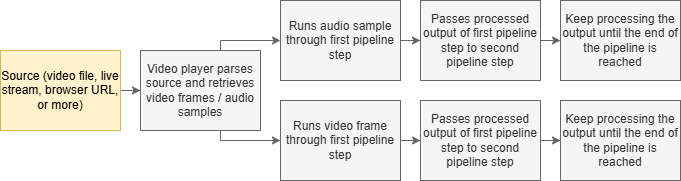
Fig. 1 Example of a pipeline from video players.#
To create a new pipeline, use the pipeline builders AudioPipelineBuilder or VideoPipelineBuilder. These builders
serve as a convenient way to create pipelines without having to manually create each step. If you don’t want a pipeline,
use the NO_OP pipeline constants, which is a pipeline that does nothing and simply returns the input.
  final VideoPipelineStep videoPipelineStep = PipelineBuilder.video()
    .then(VideoFilter.GRAYSCALE) // converts frame to gray scale
    .then(VideoFilter.INVERT) // inverts the colors of the frame
    .build();
  final AudioPipelineStep audioPipelineStep = AudioPipelineStep.NO_OP; // does nothing